
Vegan Maps2.4.0 - Google Play
You'll be able to see results in few seconds.
Publisher Description

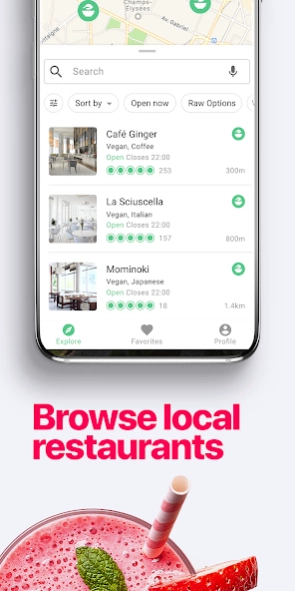
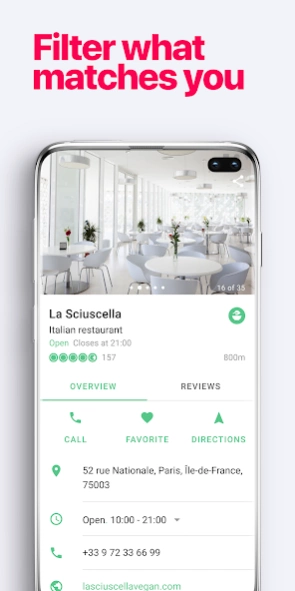
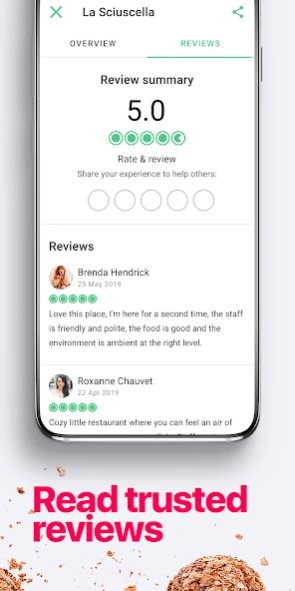
Vegan restaurants near me
Vegan Maps is our free, vegan and raw food finder app that contains over 10,000 restaurants, eateries, and cafes in 150 countries. We take the hunt for vegan-exclusive restaurants seriously. Vegan Maps compiles a database of exclusively vegan and raw establishments around the world. With our app, you can feel confident that the restaurants you’re choosing to match your diet. This means that Vegan Maps will never include locations that offer meat or dairy options.
Within Vegan Maps, you will get notifications about new vegan and raw food places opening up near you as well as access to a detailed database that allows you to filter through vegan and raw restaurants around the world. You can save your favorite places in a separate list and read thousands of customer reviews for each location, as well as write your own. This is a one-of-its-kind free app that is specialized with filters, allowing you to personalize your search. Begin your discovery of vegan and raw food locations by downloading Vegan Maps and being a part of the healthy and ethical food phenomenon happening across the globe!
Features:
• Search over 10,000 Vegan & Raw restaurants.
• Notifications as new restaurants open near you.
• Always exclusively vegan and raw places.
• Explore vegan options in 150 countries!
About Vegan Maps
The company that develops Vegan Maps is Vegan Maps. The latest version released by its developer is 2.4.0.
To install Vegan Maps on your Android device, just click the green Continue To App button above to start the installation process. The app is listed on our website since 2022-09-04 and was downloaded 0 times. We have already checked if the download link is safe, however for your own protection we recommend that you scan the downloaded app with your antivirus. Your antivirus may detect the Vegan Maps as malware as malware if the download link to com.vegan.veganmaps is broken.
How to install Vegan Maps on your Android device:
- Click on the Continue To App button on our website. This will redirect you to Google Play.
- Once the Vegan Maps is shown in the Google Play listing of your Android device, you can start its download and installation. Tap on the Install button located below the search bar and to the right of the app icon.
- A pop-up window with the permissions required by Vegan Maps will be shown. Click on Accept to continue the process.
- Vegan Maps will be downloaded onto your device, displaying a progress. Once the download completes, the installation will start and you'll get a notification after the installation is finished.
Program Details
System requirements
Download information
Pricing
Version History
version 2.4.0
posted on 2022-09-04
We update the Vegan Maps app as often as possible to help you find great places nearby, wherever you are. Here’s what you’ll find in the latest version:
+ Various performance improvements and bug fixes
+ More restaurants added
Disclaimer
Official Google Play Link
We do not host Vegan Maps on our servers. We did not scan it for viruses, adware, spyware or other type of malware. This app is hosted by Google and passed their terms and conditions to be listed there. We recommend caution when installing it.
The Google Play link for Vegan Maps is provided to you by apps112.com without any warranties, representations or guarantees of any kind, so access it at your own risk.
If you have questions regarding this particular app contact the publisher directly. For questions about the functionalities of apps112.com contact us.
